
Automated Project Task Assignment and Notifications Using Power Automate
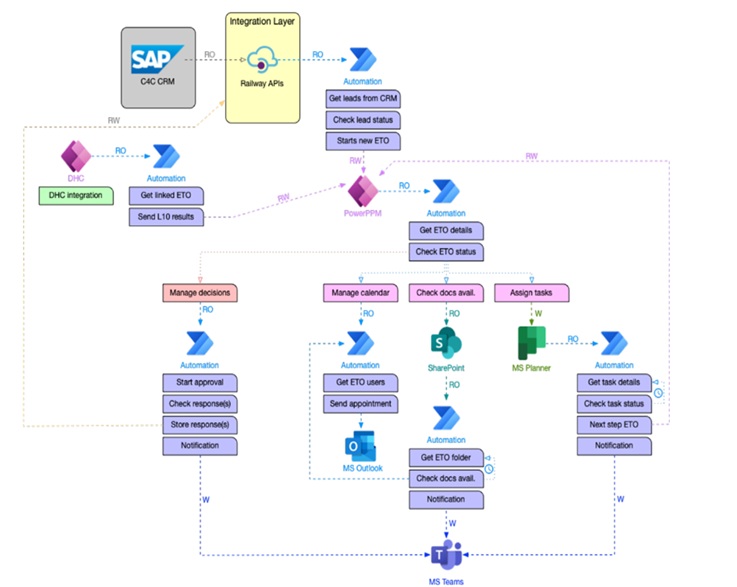
Unified End-to-End Project Management Automation Using Power Automate Integrated with CRM, Power PPM, Outlook, Teams, Planner, Calendar, and SharePoint for Seamless Assignment, Tracking, and Notifications.
The Challenge
The organization struggled with disconnected project tools, manual task tracking via emails and spreadsheets, and no real-time visibility. Lack of integration across CRM, Outlook, Planner, SharePoint, and Teams led to delays, missed deadlines, and inefficient communication.
Key Issues:
No automatic alerts or deadline reminders
Disconnected tools causing duplication of work
Lack of visibility into real-time project status
Delayed escalations and poor stakeholder communication
The Solution
🔄 1. Project Creation Trigger (CRM + Power PPM)
Project triggered when a sales opportunity is marked “Won” in Dynamics 365 CRM
Power Automate creates a project in Power PPM and logs metadata in SharePoint
👥 2. Automated Task Assignment (Planner + SharePoint + Outlook)
Tasks are generated based on the project template in Power PPM
Tasks are assigned in Microsoft Planner and mirrored in SharePoint
Assigned users receive detailed Outlook email and Teams alert
📆 3. Calendar Integration (Outlook Calendar)
Milestone dates and deadlines are synced to assigned users’ Outlook Calendars
Calendar invites include task summaries and due dates
🗂 4. File and Metadata Management (SharePoint)
Project documents automatically created in SharePoint project folder
Task status, owner, and progress logs updated through flows
🔔 5. Real-time Alerts and Escalations (Teams + Outlook)
Daily and weekly reminders for upcoming or overdue tasks via Teams adaptive cards
Escalation emails for high-risk delays sent to project managers via Outlook
📊 6. Portfolio View (Power PPM + Planner + SharePoint)
Power Automate keeps task completion statuses in sync across Planner and Power PPM
Portfolio dashboards reflect real-time progress
Business Benefits
| Benefit | Outcome |
|---|---|
| 🔁 End-to-End Automation | No manual intervention from CRM to execution |
| 📣 Proactive Communication | Timely reminders and escalations reduced delays |
| 🧩 Seamless Integration | Unified workflow across all Microsoft 365 services |
| 📈 Real-Time Visibility | Stakeholders access live project health data in Power PPM dashboards |
| 🧠 Improved Productivity | 35% increase in on-time task completion; 40+ hours saved monthly |